

Module 1 – Change the Display View
Description on the Content Action – How to choose the format in which to display content on the portal.

Change the Display ViewDisplay ViewThe portal allows you to choose the format in which to display a folder. 1. Click on the arrow next to the word Display. 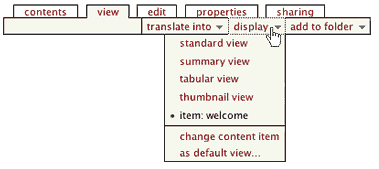
2. A drop down menu containing display options will open:
3. The portal saves the chosen display view for a specific folder until you change the view. 4. Note that these options may not always be available, according to where you are in the portal, and the permissions you have. |
 |
 |